Apple Silicon Mac & Windows · Works offline
Reverse image search for your own files
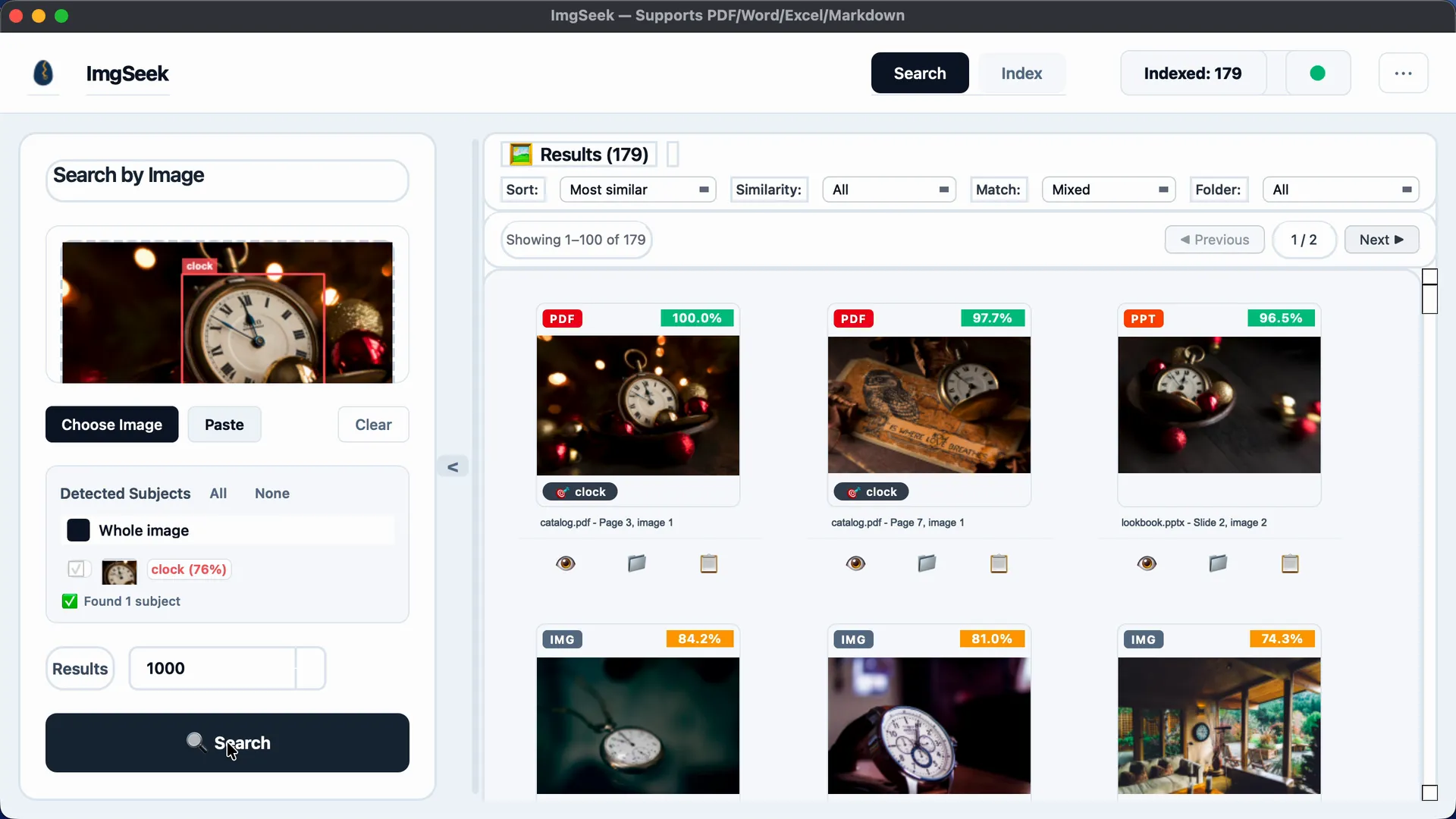
Drop in an image and ImgSeek finds similar pictures across your folders — including the ones buried inside PDFs, Word documents and PowerPoint decks. Fully offline: your images never leave your computer.
No payment · 1 device · upgrade to perpetual any time
Prefer to try it first? Download directly: macOS·Windows
Watch the demo ↓2 devices · one key across Mac + Win · lifetime free updates
Made for moments like these
“Where’s the original of this?”
A client sends back a cropped, resized screenshot of something you designed last year. Drop it in to find the full-size image you exported — your layered source file is usually saved right next to it.
Which shoot was this frame from?
Find near-duplicates and alternate takes of a photo across years of folders. Works with JPEG, PNG, TIFF and WebP, iPhone HEIC photos and camera RAW files.
The picture is somewhere in a PDF
Catalogs, quotes, lookbooks, slide decks. ImgSeek opens PDF, Word, Excel and PowerPoint files, indexes every image inside, and tells you which file — and which page or slide — a match came from.
Is this product already in our catalog?
Check a new supplier photo against thousands of existing product shots before you list the same item twice.
What ImgSeek does that Finder and Google Lens don’t
Finds images inside documents
Every image embedded in your PDF, Word, Excel and PowerPoint files gets indexed. A match shows which file it’s in — and for PDFs and decks, the page or slide.
Fully offline
Indexing and search run on your own computer. No uploads, no account, no cloud. The app only goes online to activate your license and check for updates.
Search for one object in a busy photo
ImgSeek spots common objects in your query image — furniture, vehicles, animals, everyday items. Tick the chair instead of the whole room, and it searches for just that. For anything else, use the whole image.
Matches what images look like
A vision model (DINOv2) compares the pictures themselves, so resized, cropped and re-exported copies still turn up. No tags, keywords or filenames needed.
Native on Apple Silicon, runs on any Windows PC
Uses the GPU on M-series Macs. On Windows no graphics card or driver setup is needed; if the PC has an NVIDIA card, it's used automatically to index faster.
Index once, then only what changed
After the first pass, only new or modified files are processed.
How it works
- 01
Add a folder
Any folder on your Mac or PC, an external drive or a NAS. Subfolders and the documents inside them are included.
- 02
Let it index
The first pass reads each image and document once and stores the index on your disk. After that, only changes are processed.
- 03
Drop in an image
Drag in a picture or paste a screenshot. Search with the whole image or one detected object, and get matches ranked by similarity.
What it doesn’t do
Better you hear it here than after you buy.
- No Intel Macs
- The Mac version needs Apple Silicon (M1 or later). On Windows, 64-bit Windows 10 and 11 are supported.
- Not notarized by Apple yet
- macOS will block the first launch. Opening it takes one extra step — here’s how.
- Closed source
- ImgSeek is a paid app. If all you need is to find exact duplicates, free tools like dupeGuru or Czkawka will do the job.
- Slower on most Windows PCs
- Without an NVIDIA graphics card, Windows indexes on the CPU, so a large library takes noticeably longer than on an Apple Silicon Mac.
- No text search or design source files
- You search with an image, not by typing words. It indexes images, not .psd, .ai or .sketch source files; an exported PNG or JPEG next to them is found.
- Object detection covers common categories only
- It recognizes everyday things like furniture, vehicles, animals and household items. Anything else may go undetected or get the wrong label — search with the whole image and matching works just the same.
Buy it once. Keep it forever.
One plan in v1. No asterisks.
Perpetual License
- macOS (Apple Silicon) + Windows 10/11 x64
- One key, 2 activations shared across Mac + Win
- Lifetime free updates, major versions included
- Activated version keeps working forever
- Runs offline after activation — no license check-ins
- Email support
We generate your License Key after payment and email it to the address you provide.
Frequently asked
Is it really perpetual?
Yes. One payment, and activated versions keep working forever. Every future version is free too, major upgrades included.
Can I use my 2 activations across both Mac and Windows?
Yes. One License Key gives you 2 activations to split however you like between Mac and Windows — e.g. Mac laptop + Windows office PC.
What if I change machines?
In v1, email support@imgseek.org and we'll manually free up an activation slot for you. A self-serve device management page is on the v2 roadmap.
Lost the email — how do I recover my License Key?
Enter your purchase email on the recovery page and we'll resend the License Key. Rate-limited to one request per 10 minutes per email.
Do I need internet?
Indexing and search run entirely offline, and your images and data never leave your machine. Current versions of the app go online once, at activation, to send us your License Key and a device identifier so we can verify the license; after that, the license is never checked online again. Older-format keys issued earlier are verified on your machine with no network call at all. The one other connection is the update check: the app reads a small version file from download.imgseek.org, and that request carries no images, file details, or License Key.
Which document formats can it extract images from?
PDF, Word (.docx), Excel (.xlsx) and PowerPoint (.pptx). Image files: JPEG, PNG, WebP, BMP, GIF and TIFF, iPhone HEIC, and camera RAW (Canon CR2/CR3, Nikon NEF, Sony ARW, Fujifilm RAF, DNG, Olympus/OM System ORF, Panasonic RW2). HEIC and RAW need version 0.4.0 or later.
Will it run on a Windows PC without a GPU?
Yes. The Windows build runs on any 64-bit Windows 10 or 11 PC, with no dedicated GPU and no driver setup. If the PC has an NVIDIA graphics card, ImgSeek uses it automatically and indexes faster; without one, the first pass over a large library takes longer. M-series Macs use hardware acceleration automatically.
How do I get in touch? (payment issues / invoice / device swap / refund)
Checkout is handled by Creem, our online reseller, and accepts cards, PayPal, Apple Pay and Google Pay. For a failed payment, an invoice, a device swap, a refund, or any other order question, email support@imgseek.org. We handle every request personally and reply within one business day.